



What is BDR Suite Vembu?
BDRSuite by Vembu offers comprehensive and cost-effective Backup and Disaster Recovery software tailored to meet the diverse data protection requirements of Businesses and Service Providers. BDRSuite provides robust backup solutions for various IT workloads, including virtual machines, servers, endpoints, SaaS applications, cloud VMs, NAS/File Shares, and databases & applications. It allows storing backups anywhere and central management of the entire backup infrastructure.
About BDR Suite
BDR Suite offers a flexible pricing model tailored to your needs:
Subscription-Based
Flexible monthly or annual subscriptions
Perpetual Licensing
One-time license with ongoing support
Pay-as-You-Go
Cloud-based consumption model
Use Case: BDR Suite enables comprehensive backup and disaster recovery for virtual, physical, cloud, and SaaS environments.
Benefits of Integrating Vembu BDR Suite with StorX
- Enhanced Data Control: StorX's decentralized model gives users more direct control and ownership of their backup data. Businesses integrating Vembu BDR with StorX could feel more secure knowing that their data is stored in a decentralized environment, giving them greater autonomy and reducing reliance on a single cloud provider.
- Built-in Redundancy: StorX's decentralized model inherently provides redundancy, meaning backup data is distributed across multiple nodes for improved reliability.
- Strong Security: StorX offers strong encryption and decentralization, meaning data is securely encrypted before being uploaded to the network.
- Cost-Effective Storage: By integrating with StorX, Vembu can leverage decentralized cloud storage, which typically offers lower costs than traditional centralized cloud providers.
- Global Accessibility: For businesses with teams spread across multiple locations, StorX's decentralized nature can help ensure that backup data is accessible and protected in a way that is not limited by physical geographic locations.
- Centralized Management: Integrating the Vembu BDR Suite with StorX could streamline backup management by centralizing the backup process and storage management within a single interface.
Note: The brands and logos belong to their respective companies. For more information, visit their official website: https://www.bdrsuite.com/about-us/ to download the application.
Getting Started with StorX
Before you begin: You need an active StorX account. Join our community →
Required Credentials
Once your StorX account is set up, you'll need these credentials:
- Access Key - Your unique access identifier
- Secret Key - Your private security key
- Endpoint URL - The StorX storage endpoint
Integrating BDR Suite Vembu with StorX
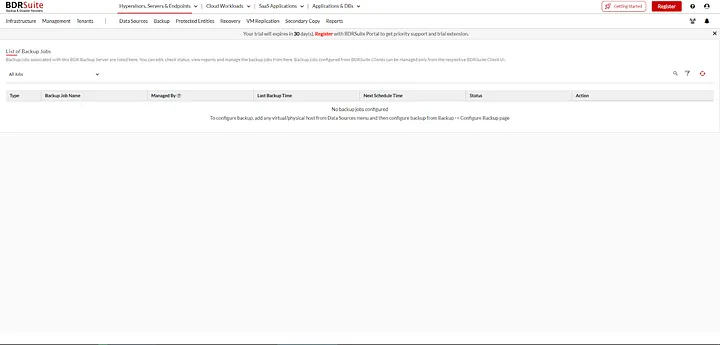
1. Log in to the BDR Suite Vembu application. You will see the interface below:
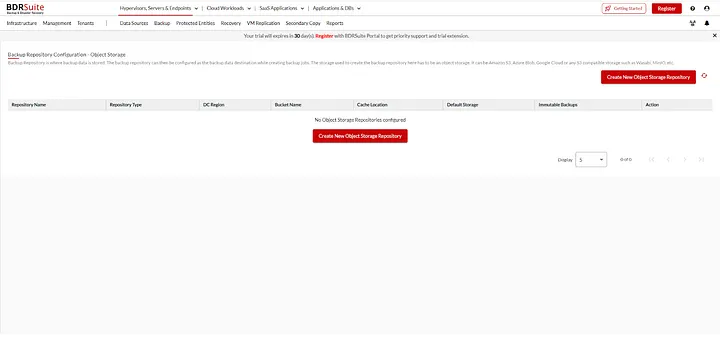
2. Select Backup Infrastructure from the side menu and choose Backup Repositories:
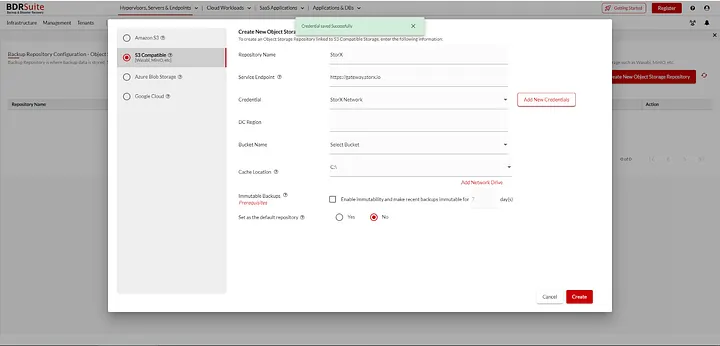
3. Create a new Object Storage Repository. Select S3 Compatible as the storage type and enter your StorX Access Credentials:
- Repository Name (e.g., "StorX-Backup")
- Server Endpoint:
gateway.storx.io - Access Key (from StorX)
- Secret Key (from StorX)
- Select your storage location (vault/bucket)
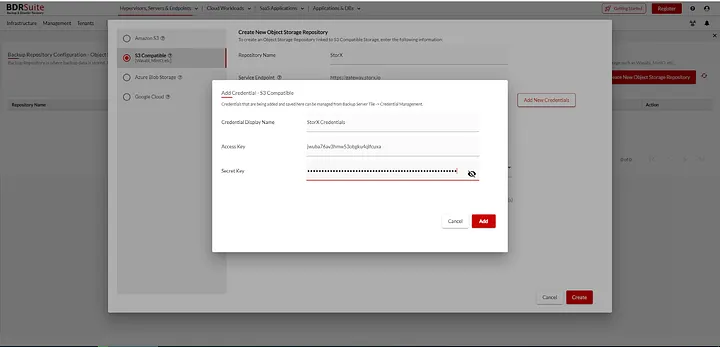
4. Enter the repository details, add credentials, select the storage location, and click Create:
5. Once successfully added, the repository will appear in the listing:
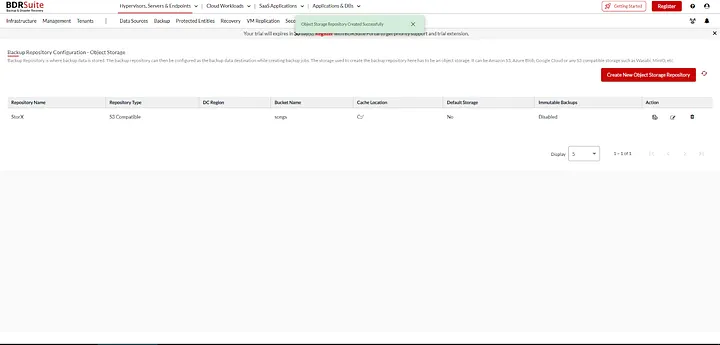
✓ Integration Complete! You have successfully integrated BDR Suite Vembu with StorX. Your backups can now be stored securely in decentralized storage.
Next Steps
- Create backup jobs targeting your new StorX repository
- Configure backup schedules and retention policies
- Monitor backup status and storage usage
- Test disaster recovery procedures