



What is Simple S3 Browser?
Simple S3 Browser is a free Android app that allows users to access and manage Amazon S3 and S3-compatible storage clouds, including StorX decentralized storage.
Advantages of Simple S3 Browser with StorX
- Reliably upload and download your files to and from StorX
- Publish your content using Amazon S3 compatibility
- Browse, create, and delete StorX vaults (buckets)
- Share your vaults with other StorX users
- Use vaults shared by other StorX users
- Set access control on vaults and files
- Keep your files backed up in encrypted form
- Manage your Amazon CloudFront distributions
Before you begin: You need an active StorX account. Join StorX →
Required StorX Credentials
- Access Key - Your unique access identifier
- Secret Key - Your private security key
- Endpoint URL -
gateway.storx.io
Need help getting your credentials? Learn how to get Access Keys →
Step-by-Step Integration Guide
1. Install Simple S3 Browser from the Google Play Store on your Android device. Open the app to see the main interface:
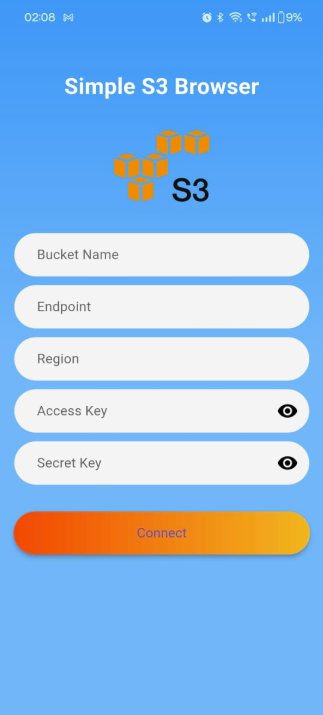
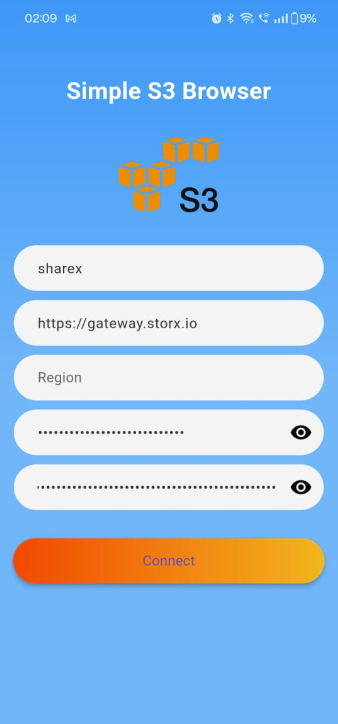
2. Enter your StorX credentials in the input fields:
- Access Key: Your StorX Access Key
- Secret Key: Your StorX Secret Key
- Endpoint:
gateway.storx.io
3. Once connected, you'll see a list of your StorX vaults. You can now upload, download, and manage files directly from your Android device:
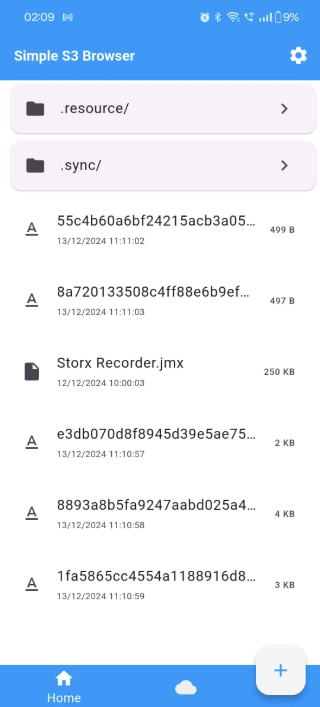
✓ Integration Complete! You have successfully connected Simple S3 Browser to your StorX decentralized storage. You can now manage your files directly from your Android device.
What You Can Do Now
- Upload Files: Upload photos, videos, and documents from your Android device to StorX
- Download Files: Download files from StorX to your device
- Manage Vaults: Create, delete, and browse your StorX vaults
- Share Files: Generate shareable links for your files
- Set Permissions: Configure access permissions for your files and vaults
💡 Pro Tip: Simple S3 Browser supports background uploads and downloads. You can continue using other apps while your files are being transferred to StorX.